Tired of using Calendly! Looking for a Calendly alternative or a better scheduling tool? You’re not alone.
I tested 57 calendar scheduling tools over the course of three months. Here are 12 great alternatives to Calendly. These tools are easy to use, affordable, and packed with features. They help you manage appointments and meetings efficiently.
Check out these Calendly alternatives and choose the scheduling tool that is right for you.
12 Best Calendly Alternatives
Some platforms are perfect for freelancers who need basic scheduling. Others are better suited for teams, businesses, and sales professionals. Many offer useful features like CRM integrations, automated reminders, and custom booking options.
Whether you want a free app or an affordable paid tool, this list has something for everyone. You’ll find platforms that integrate with popular tools. This makes it easy to organize your schedule without having to change apps.
Here’s a list of the best Calendly alternatives. I’ve reviewed their features, pricing, benefits, and limitations. This will help you choose the right platform that meets your scheduling needs.
1. Calendar.com

Calendar.com stands out as a top choice for meeting scheduling needs. It has smart tools like intelligent links and built-in polling. These features make meeting planning easy.
With Calendar.com, you can do more than schedule meetings. Plan group lunches right from the booking page and even select nearby restaurants. You can customize meeting durations, frequency, and locations for personal or professional use.
Your calendar connects to the platform. You can set up appointments right on the dashboard. Its reporting feature shows all your meetings on the calendar. It helps you stay organized. If you’re looking for a Calendly alternative, Calendar.com is worth considering.
Top Features of Calendar.com
- Sync all your calendars for a seamless, unified view of your schedule.
- Add events to your favorite calendars. They will sync automatically with Calendar.com.
- Stay on top of your plans with our mobile app, perfect for on-the-go scheduling.
- Enjoy advanced features, including customizable meeting types and location settings.
- Integrate with popular tools like Slack to ensure seamless communication.
- Access team calendars to streamline collaboration and stay aligned.
Pros
- Create sub-calendars or shared calendars for better organization.
- Get SMS alerts for meetings and appointment reminders.
- White-label your scheduling pages for a professional look.
Cons
- New features are still in beta, as it is a new product.
Pricing
Calendar.com has a free plan with basic tools. The Standard plan costs $25 per user monthly, while the Pro plan costs $30 per user monthly. For larger teams, the Enterprise plan offers custom pricing.
2. HubSpot Meetings

HubSpot Meetings is another powerful Calendly alternative. It’s even better if your team uses HubSpot’s CRM. It lets customers or prospects book meetings directly with your team. You can create custom meeting links for personal or group calendars. You can also add these links to landing pages.
The best part is that HubSpot Meetings integrates with HubSpot’s free CRM. Each meeting is linked to your customer data. This gives sales and support teams useful details about who they’re talking to. This helps make conversations more productive and meaningful.
You can also share schedule links in emails, canned replies, or sales playbooks. HubSpot can record and save details for short calls. This helps you easily track and manage customer interactions.
Top Features of HubSpot Meetings
- Native integration with HubSpot CRM and other HubSpot tools.
- Direct sync with Google Calendar and Outlook 365.
- Customizable meeting pages and links.
- Group or round-robin scheduling to balance team availability.
- Automatic contact creation inside HubSpot CRM.
- Embeddable calendar links for websites, landing pages, or emails.
Pros
- Direct integration with HubSpot CRM and call recording.
- Reliable calendar syncing with Google and Outlook.
- Easy customization for meeting pages.
Cons
- Works best for HubSpot users; limited outside of its ecosystem.
Pricing
HubSpot Meetings are free with HubSpot CRM. Premium plans in HubSpot Sales Hub and Service Hub offer advanced features.
3. Doodle

Doodle is a popular scheduling tool and a great alternative to Calendly. It makes group scheduling easy, especially for meetings with many attendees. Unlike Calendly, Doodle allows organizers to create a poll with multiple time options.
Attendees choose the time slots that work best for them. This helps find the best time for everyone, even across different time zones.
Doodle works entirely on its platform, so there’s no need to worry about email issues. Its clean design makes it easy to use, even for those who are new to technology. If you’re planning group meetings, Doodle can save time and help everyone stay organized.
Top Features of Doodle
- Free scheduling polls for many participants.
- Automated confirmation and reminder emails.
- Clear visual overview of available and unavailable times.
- Calendar syncing with popular providers.
- No account is required for quick, one-off scheduling.
Pros
- Option to set blackout days.
- Excellent for group scheduling.
- Ability to limit the number of bookings per day.
- Automatic time zone adjustments.
Cons
- Advanced features are only available on paid plans.
- Limited integrations are compared to competitors.
- Basic feature sets may not fit all business needs.
Pricing
Doodle offers a free version with core features. Paid plans start with the Pro Plan at $14.95 per user per month for advanced functionality.
4. Acuity Scheduling

Acuity Scheduling is a trusted appointment scheduling platform. It’s a fantastic option instead of Calendly. This works well for small businesses and service providers. Acuity is designed for teams and service-based businesses. This includes salons, consultants, medical professionals, and repair services.
With Acuity, clients can book appointments. They can pay for services and manage their schedules, all in one place. This reduces the need for repeated contact and helps businesses save time.
The platform has features such as automated reminders, video meeting links, and billing software integration. These tools provide a complete scheduling solution. They help businesses stay organized and focused.
Top Features of Acuity Scheduling
- Affordable plans for both individuals and businesses.
- Wide integrations, including Mailchimp, QuickBooks, Zoom, and calendar apps.
- Data dashboards to track no-shows and successful meetings.
- Add-ons for checkouts, coupons, and extra scheduling features.
- Intake forms for medical, dental, or consulting practices.
Pros
- Unlimited appointment scheduling.
- Embeddable booking widget for websites.
- Option to create coupons and vouchers.
- SMS notifications for upcoming appointments.
Cons
- No permanent free plan.
- Lower-tier plans include Acuity branding.
- Memberships and subscriptions are only available in mid-tier plans.
Pricing
Acuity does not offer a free version but provides a 7-day free trial. Paid plans start at $20/month and go up to $61/month, depending on features. Both monthly and annual billing options are available.
5. Appointly
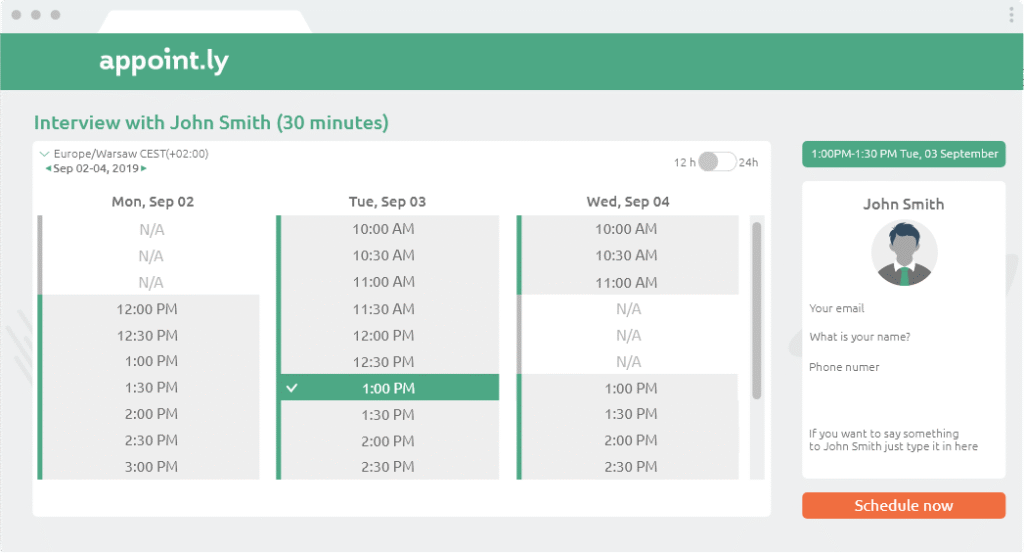
Appointly is a strong tool for scheduling. It simplifies booking appointments online. It works like Calendly, allowing you to create events and share a scheduling link with others. Once someone selects a time, the event is automatically added to your calendar.
The platform supports recurring appointments, custom fields, and preferred contact methods. You can set your availability by day, week, or month. This gives you complete control over your schedule. Appointly is suitable for individuals, freelancers, and professionals. It provides a simple solution without any additional team features.
This tool helps you stay organized. It saves time and makes appointment management easy.
Top Features of Appointly
- Clean and easy-to-use interface.
- Simple scheduling link design.
- Works with Google, iCloud, Outlook, Office 365, and Exchange.
- Automatic meeting routing to personal calendars.
- Time zone auto-adjustments for participants.
Pros
- Simple and easy for beginners.
- Option to create custom fields.
- Free plan with solid core features.
Cons
- No team scheduling or round-robin options.
- No shared calendar views.
Pricing
Appointly offers a 14-day free trial. The basic plan is free, while the Pro plan costs $10/month. An Enterprise plan is also available upon request through their sales team.
6.Vocus.io

Vocus.io is a leading meeting scheduler built for businesses. It lets you create personalized booking pages. You can choose the day, time, and duration of the meeting. You can add rules, like cancellation policies and time buffers. This will improve the experience.
Vocus.io lets you easily share booking links or embed calendars on your website. Its standout feature is its email tools. These tools include automated emails, snooze options, and templates. They help your team stay connected with clients and leads. It’s a great alternative to Calendly for businesses that want more than a schedule.
Top Features of Vocus.io
- Add custom form fields easily to capture participants’ details.
- Fully customizable scheduling pages, including custom domains and branding.
- Integrates with tools like Zapier, Salesforce, Microsoft Teams, Zoom, and Gmail.
- Chrome extension for quick access to core features.
- Built-in email automation to follow up with contacts.
Pros
- Combines scheduling with email automation and canned responses.
- Team features for shared inboxes, templates, and analytics.
Cons
- There is a lack of advanced enterprise options like SSO or SAML.
- Some features are only available on higher-tier plans.
Pricing
Vocus.io offers a 30-day free trial. Paid plans start at $5 per user each month. You can choose from Basic, Starter, or Professional tiers based on the features you need.
7. Picktime.com

Picktime.com is the perfect scheduling tool for businesses and individuals. It helps service-based businesses, such as salons and clinics, easily manage appointments.
You can book, reschedule, and set appointment details in one place. Picktime supports businesses with multiple locations. It provides tools to track performance and manage activities across teams. It’s an easy way to organize your schedule and keep everything on track.
Top Features of Picktime.com
- Syncs with personal and professional calendars to stay organized.
- Accept payments and deposits via PayPal, Stripe, and Square.
- Integrates with Zoom and other video platforms for virtual meetings or classes.
- Automatic notifications for customers and staff to prevent missed appointments.
- Built-in dashboard to manage ongoing classes, subscriptions, or recurring services.
Pros
- Ideal for service-based businesses with recurring appointments.
- The integrated review system allows customers to provide feedback easily.
Cons
- Slightly fewer advanced features compared to competitors.
- The learning curve may be steeper for new users.
Pricing
Picktime offers a free plan for up to three users. Paid plans are available. The Starter Plan costs $4 per user per month. The Pro Plan is $3 per user per month but needs at least ten users.
8. SimplyBook.me

SimplyBook.me is a scheduling tool designed for businesses, not individuals. It works best for service-based organizations that need to efficiently manage client bookings.
The platform lets you create client portals and even a custom booking app. Use the design tools to create booking pages. Customize them to fit your business style.
SimplyBook.me offers an API that seamlessly connects to marketing and sales tools. It meets HIPAA and SOAP standards.
It’s a great choice for healthcare providers and businesses that manage sensitive data.
Top Features of SimplyBook.me
- Integrations with Instagram, Facebook Messenger, Google Business, Google Meet, WordPress, and more.
- Customizable options include coupon codes, custom fields, and client portals.
- In-person POS system to accept payments directly.
- Personalized notifications and email schedules based on business needs.
- Ability to create professional booking pages and apps.
Pros
- Intuitive and easy to navigate.
- Supports member subscriptions, patient intake forms, and other advanced use cases.
Cons
- Limited template library for booking pages.
- Higher costs compared to some similar scheduling tools.
Pricing
SimplyBook.me offers a 14-day free trial and a limited free plan. Paid plans begin at $9.90 a month. They offer extra features and advanced functionality.
9. Appointy.com
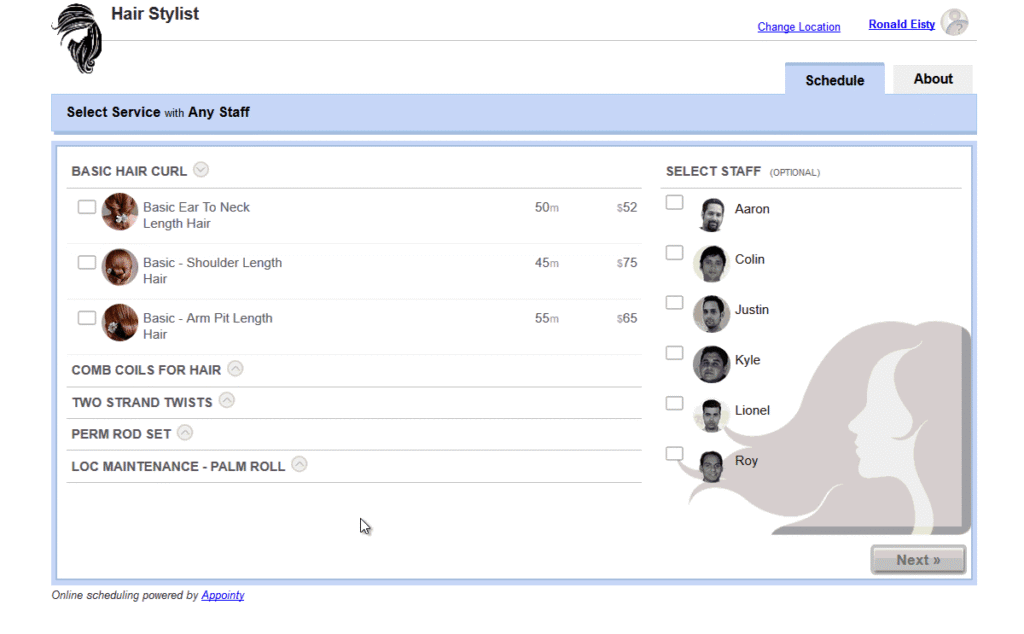
Appointy.com is an online appointment scheduling platform for businesses of all sizes. It supports bookings for one-on-one meetings, classes, workshops, events, and tours. This makes it a great option for service-based businesses.
If you don’t have a website, Appointy.com offers subdomains where customers can book directly. Businesses can set their own working hours. They can sync calendars and accept bookings in available time slots.
With its easy-to-use features, Appointy.com helps businesses manage appointments and save time.
Top Features of Appointy.com
- Booking through Facebook and websites.
- Options for last-minute deals and coupon codes.
- Guest login for event partners or lecturers.
- Automatic client verification.
- Prepayment acceptance for appointments or services.
Pros
- Ability to use social media platforms, like Facebook, for booking.
Cons
- Limited payment options (PayPal or Authorize.net only).
- White labeling options are minimal.
Pricing
Appointy offers a 14-day free trial and a basic free plan. The Growth tier costs $19.99 a month. It’s for businesses that need advanced features.
10. Microsoft Bookings

Microsoft Bookings is an easy-to-use tool for scheduling appointments. It comes with some Microsoft 365 Business plans. It helps businesses manage bookings and customer data in one place.
Bookings lets your clients check availability and book appointments online. It works well with other Microsoft tools like Teams, Outlook, and Excel. Customer information is automatically updated, saving time and keeping everything organized.
The platform also connects to SharePoint, Power BI, and Dynamics 365. This makes it a great option for businesses that already use Microsoft apps. Microsoft Bookings makes scheduling easy so you can focus on your work.
Top Features of Microsoft Bookings
- Integration with Outlook, Excel, Teams, and other Microsoft apps.
- Customizable appointment booking pages.
- Automated notifications and reminders.
- Centralized customer management.
- Reporting and analytics dashboards.
Pros
- Seamless integration with Microsoft 365 apps.
- It is easy to create a professional scheduling workflow.
- Keeps customer data organized in one location.
Cons
- Less flexibility than some other scheduling tools.
- Requires a Microsoft 365 subscription.
- Limited advanced customization options.
Pricing
Microsoft Bookings comes with some Microsoft 365 plans. It’s available in Business Standard for $12.50 per user per month. Business Premium costs $22.00 per user per month.
11. YouCanBookMe

YouCanBookMe is an online booking tool for personal service providers. It is suitable for consultants, freelancers, coaches, and therapists. Clients can book appointments directly through a simple booking page.
The platform links to Google Calendar, iCloud Calendar, and Outlook. It keeps your schedule up to date. Automatic reminders help reduce missed appointments. YouCanBookMe makes booking management easy for solopreneurs.
Top Features of YouCanBookMe
- Simple appointment booking widget.
- Customizable booking pages.
- Automated reminders for clients.
- Calendar integration with Google, iCloud, and Outlook.
- Basic client management capabilities.
Pros
- Very easy to use.
- Professional, customizable booking pages.
- Reduces no-shows with automated reminders.
- Syncs with popular calendar apps.
Cons
- Designed primarily for individual service providers rather than for teams.
- Fewer advanced features are compared to those of some competitors.
- Limited customization options.
Pricing
YouCanBookMe offers a freemium plan with basic features. Paid plans begin at $12 a month. Higher tiers offer extra client management options. Annual and bulk discounts are also offered.
12. Setmore

Setmore is an online scheduling tool for small businesses. It helps you easily manage appointments, classes, and events. Customers can book directly, and its simple tools help you stay organized.
The platform offers client management, automated reminders, email alerts, and payment processing. It also helps you manage staff schedules and availability.
Setmore has extra benefits like custom reports, SMS alerts, discounts, and coupon options. It is designed for teams who want to maximize and better manage their time.
Top Features of Setmore
- Appointment booking and scheduling for individuals and teams.
- Centralized customer database for easy management.
- Automated email reminders and basic marketing tools.
- Staff and business availability management.
- Payment processing, custom reports, and coupon functionality.
Pros
- A complete set of integrated features.
- Simplifies both appointment booking and client management.
- Tools for communication and promotion.
- Scales from individual use to full team management.
Cons
- It may feel complex for users with simple needs.
- Reporting features are limited compared to other platforms.
- Customer support is not as strong as some competitors.
Pricing
Setmore offers a free plan that supports unlimited appointments per month. Paid plans start at $12 per user/month for core scheduling and customer management. Team plans begin at $9 per user/month with additional features for larger businesses.
Pros and Cons of Using Calendly
Calendly is a simple scheduling app that helps you organize meetings without endless emails. Just share a link, and others can choose a time that fits their schedule. It connects directly to popular calendar apps like Google Calendar, Outlook, and iCal.
This tool is great for individuals or teams who need an easy way to manage meetings. It has features like group scheduling, automatic reminders, and calendar syncing. This helps prevent double bookings. Calendly works across all devices and allows for basic event customization.
Top Features of of Calendly
- Supports group events with multiple attendees.
- Integrates with major calendar platforms.
- API is available for app integrations.
- Team scheduling options.
Pros
- Syncs many calendars to prevent conflicts.
- Sends automated reminders to organizers and attendees.
- Easy rescheduling options.
Cons
- Group events need Calendly accounts for all participants.
- Limited branding options for booking pages.
- Separate accounts are needed for businesses with many entities.
Calendly works well for basic scheduling. However, it might not suit businesses with more complex needs.
Final Thought
Calendly is a great scheduling tool, but it’s not the best choice for everyone. Depending on your needs, there are other tools that may work better for your business.
If you’re short on time, Calendar.com stands out with its affordable plans and useful features. HubSpot Meetings is another strong option for managing appointments.
Before choosing a scheduling tool, think about what you need. Are you managing one-on-one meetings, team schedules, or group events? A clear goal can help you find the right solution.
We’ve compiled a list of 12 alternatives to Calendly. This guide compares features, pricing, and tools. It helps you choose the best scheduling tool for your business.
For more on productivity tools and tech solutions, visit TRT Tech. They offer free consultations.