Did you know there are over 1.13 billion websites? That’s a huge number! Unexpectedly, only about 18% of them are active. Why does this happen? One common reason is that people forget to renew their hosting plans or domain names.
Another reason is that many websites lack a clear purpose. Every website needs to have a goal that’s simple and easy to understand.
For example, a personal blog might be great for sharing stories or hobbies, but it wouldn’t work well for a business selling products online.
If you want your website to succeed, the first step is deciding what you want it to do. Is it for sharing information, selling products, or building a community? Understanding the purpose will help you make better choices in design and content.
Keep reading to explore different types of websites and find out how to choose the one that fits your needs perfectly!
10 Types of Websites With Their Examples & Structures
The internet has many types of websites. How do you choose the right one for your needs? This guide explains 10 popular website types in simple terms.
Each type serves a specific purpose. You can showcase your projects, start a blog, sell products online, or promote your services. By the end, you’ll know which website fits your goals and how to start building it.
Ready to learn more? Keep reading to explore your options!
1. E-Commerce Website
An e-commerce website is an online store. Businesses use it to sell products or services. Customers can browse items and buy them directly. It is fast and convenient for everyone.
Who Should Have an E-commerce Website?
- Service-Based Businesses: If you offer services like consulting, cleaning, or repairs, an e-commerce site can help. You can sell service packages online. Customers can book appointments directly through your website.
- Retailers and Wholesalers: Businesses that sell physical goods can benefit from e-commerce platforms. They can offer products like clothing or electronics to more customers. This helps them grow their sales and reach more people.
Types of E-commerce Websites
There are multiple forms of e-commerce platforms:
- Business-to-Consumer (B2C): Selling directly to individual buyers.
- Business-to-Business (B2B): Designed for transactions between businesses.
- Consumer-to-Consumer (C2C): Platforms where individuals sell products to each other (e.g., online marketplaces).
- Affiliate Marketing Websites: Platforms that earn commissions by promoting other brands’ products.
Essential Features of an E-commerce Website
When creating an e-commerce site, these features are vital for success:
Product Pages
Each product should have its dedicated page. Include:
- High-quality images and videos.
- Detailed product descriptions (e.g., specifications, size, pricing).
- Clear options like “Add to Cart” or “Buy Now.”
Category Pages
Organize products into categories or subcategories to improve navigation. For example:
- Group items by brand, size, price range, or customer preferences.
- Help buyers find what they need quickly with filters.
Shopping Cart
The shopping cart is a must for any e-commerce website. It allows customers to:
- View the items they plan to buy.
- Update quantities or remove products.
- See total costs, including taxes and shipping fees.
Example of an E-commerce Website

AliExpresss is a great example of a user-friendly e-commerce site. This is one of the best e-commerce website right now. It categorizes products into sections such as electronics, fashion, and home goods. Amazon also provides subcategories to make it easy for customers to find specific items.
2. Blog Website
A blog website is a platform focused on sharing written content in an organized way. The term “blog” comes from “weblog,” and it’s one of the most popular types of websites, with over 600 million blogs available online.
Who Needs Blog Websites?
- Individuals: Blogs are perfect for sharing your personal experiences, hobbies, and interests. Whether you are passionate about cooking, photography, or writing, a blog allows your voice to be heard.
- Businesses: For businesses, blogs are excellent tools to promote products and services. You can create educational content related to your industry, helping attract potential customers and build brand credibility.
- Professionals: Professionals like consultants and experts use blogs to share their knowledge and insights. It’s a great way to establish authority in your field while attracting more clients.
Types of Blog Websites
Blogs can cover countless topics, but some of the most common kinds include:
- Food Blogs – Sharing recipes, reviews, and cooking tips.
- Fashion and Beauty Blogs – Covering the latest trends in style and beauty tips.
- Travel Blogs – Helping readers explore destinations through tips and experiences.
- Health and Fitness Blogs – Focusing on well-being, exercise, and diet advice.
- Lifestyle Blogs – Covering day-to-day life topics like parenting, home décor, and self-improvement.
- Finance Blogs – Offering money-saving tips, investment ideas, and financial guidance.
Key Features of a Blog Website
If you’re planning to create a blog website, ensure it has these essential features:
1. Content Management System (CMS):
This makes it easy to create, edit, and publish content. Examples of popular CMS include WordPress, Joomla, Drupal, and Agility CMS.
2. Social Sharing Buttons:
These buttons enable readers to share your blog posts directly to platforms like Facebook, Twitter, or LinkedIn, expanding your reach.
3. Author Bio Section:
A short section about the author adds credibility and helps readers connect with the content.
4. Comments Section:
This feature allows readers to leave feedback and engage directly with the blog content, fostering a sense of community.
Example of a Successful Blog Website

One great example of a popular blog is Healthline, a trusted resource for health and wellness tips. Healthline’s website offers easy navigation, a user-friendly menu with categories like “Health Conditions” and “Discover,” and social sharing buttons. It also includes a comments section to promote reader interaction.
If you want to develop a blog website, learning from successful examples like Healthline can provide valuable insight to make your blog more engaging and effective.
3. Educational Website
Educational websites are created to offer resources, courses, and valuable information across various subjects. These platforms are essential tools for students, teachers, and educational institutions, making knowledge more accessible to everyone in need.
Who Benefits from Educational Websites?
- Students: Educational websites allow students to learn new topics, access study materials, and enroll in online courses.
- Teachers and Educators: These platforms provide teaching resources, tools for lesson planning, and opportunities for professional development.
- Institutions: Schools, universities, and training centers use these websites to host online courses and academic programs.
Types of Educational Websites
There are various types of educational websites depending on their focus and purpose. Common examples include:
- General Educational Websites: Platforms that provide a broad range of learning resources for multiple subjects.
- Language Learning Websites: Sites designed to teach new languages with interactive exercises and tutorials.
- Government Education Websites: Platforms that share official information on education policies and programs.
- Science Websites: Resources focused on scientific studies, discoveries, and educational content.
- How-To Websites: Sites that provide instructional materials for practical tasks or skills.
- Digital Libraries: Online databases hosting books, journals, and other academic materials.
Key Features of Educational Websites
The structure of educational websites ensures effective resource management and ease of use. Common features include the following:
- Course Listings: Pages dedicated to each course with detailed descriptions, requirements, and enrollment options.
- Learning Management System (LMS): Tools that help deliver courses, manage students, conduct assessments, and track progress.
- Search Functionality: Makes it easy for users to find specific information or resources quickly.
Example of a Popular Educational Website

Instruture is a well-known nonprofit organization offering free educational resources. Its website provides video lessons, practice exercises, and assessments covering a wide range of topics. The simplicity and accessibility of this platform make it a preferred choice for learners worldwide.
Why Educational Websites Matter
Educational websites play a vital role in promoting e-learning and distance education. They are critical for students seeking flexible, self-paced learning environments and for educators who need tools to better engage their students. By leveraging these platforms, institutions, and individuals alike can enhance learning experiences and make education more accessible globally.
Focus Keywords Integrated: Educational websites, learning resources, online courses, study materials, teaching resources, professional development, universities and schools, training centers, digital libraries, Learning Management System (LMS), course listings, search functionality, Khan Academy, e-learning platforms, distance learning, virtual classrooms, online education tools, academic resources, online study portals, MOOCs, EdTech, online tutoring, self-paced learning, skill development platforms.
4. Portfolio Website
A portfolio website is an online platform where individuals or businesses display their work, skills, and accomplishments. It serves as a personal or professional showcase for attracting clients, employers, or fans. Think of it as a digital version of your resume or a way to build your personal brand.
Who Needs a Portfolio Website?
- Freelancers – Professionals like designers, writers, photographers, and developers use these websites to present their projects and attract potential clients.
- Artists and Creators – Musicians, performers, and visual artists showcase their portfolios to gain exposure and connect with their audience or sponsors.
- Businesses – Companies highlight their completed projects, share client feedback, and build credibility to attract new opportunities.
Key Elements of a Portfolio Website
- Portfolio Section
This is the most vital part. It includes detailed descriptions of projects along with images, videos, or links. It highlights your skills and creativity.
- About Section
This section gives visitors information about you or your business. It covers background, skills, awards, and achievements.
- Contact Information
Make it easy for people to reach out. Include email, phone, and even links to social media platforms.
- Testimonials
Featuring reviews or quotes from satisfied clients adds credibility and builds trust with potential customers.
Example of a Popular Portfolio Website

One excellent example is Matt Farerly. The website utilizes visually striking, high-quality images to showcase his work. The clean grid layout ensures easy navigation and allows users to focus on each project. It’s a perfect example of how to present work in a structured and appealing way.
Tips for an Effective Portfolio Website:
- Use responsive design to ensure usability across devices.
- Organize projects with clear categories.
- Incorporate case studies to explain the thought process behind your work.
- Use minimalist layouts to keep the focus on your content.
- Include links to any relevant social profiles or work platforms.
Creating a portfolio website is a smart step for anyone looking to showcase their talent, build a network, or grow their business. Keep the design simple yet impactful, and always make your content easy to explore.
5. News Website
News websites are platforms that provide timely updates and accurate information on a wide range of topics. They deliver news in a user-friendly format, making it accessible for all audiences. These websites are designed to inform, educate, and engage users while offering monetization opportunities through subscription models or advertisements.
Who Uses News Websites?
- Media Companies – Traditional news outlets like newspapers, radio stations, and TV channels use websites to reach broader audiences online.
- Government Agencies – These organizations share public notices, policy updates, and important programs with citizens.
- Educational Institutions – Universities and schools utilize news websites to publish research breakthroughs, announce events, and highlight alumni achievements.
Types of News Websites
- General News Websites – Cover a variety of subjects, such as global news, politics, and lifestyle. Examples include CNN, BBC, and The New York Times.
- Niche News Websites – Focus on specialized topics, such as TechCrunch for technology or ESPN for sports.
- Local News Websites – Share news specific to certain regions, providing updates on events and issues relevant to local communities.
Features of a News Website
- Breaking News and Live Updates – Immediate updates on important and trending stories.
- Category Sections – Organized topics like politics, technology, sports, and international news for quick navigation.
- Weather Updates and Tickers – Real-time alerts and scrolling headlines to keep users informed.
- Search Bar – Easy search functionality to locate specific articles or topics.
- Subscriptions and Newsletters – Options for users to subscribe and stay updated through emails.
- User Accounts – Personalization features for content recommendations based on user preferences.
Best Practices for News Websites

An excellent news website ensures a streamlined experience with clear navigation and engaging content. For instance, the BBC News website stands out by providing a structured homepage with the latest headlines, categorized news sections, real-time updates, and live event coverage.
Pro Tip
Adding a breaking news ticker helps retain visitor attention by displaying continuous updates and creating a more dynamic browsing experience.
6. Forum Website
Forum websites are powerful platforms designed to connect people with shared interests. These sites enable users to engage in conversations, share information, and solve problems together. They provide a space for discussions that cater to both general and niche topics, building vibrant online communities.
Who Should Create Forum Websites?
Anyone can create a forum website, but they are especially useful for the following groups:
- Tech Companies: Forums serve as a hub for customer support, troubleshooting, and technical discussions about software, hardware, or online services.
- Gaming Companies: Players can use gaming forums to discuss strategies, share tips, and report bugs.
- E-commerce Businesses: Forums help businesses connect with customers through product discussions, advice, or support after a purchase.
Types of Forum Websites
Forums come in different formats, depending on their purpose and audience. The five most common types are:
- Standard Forums: General forums for diverse discussions.
- Q&A Forums: Platforms focused on asking and answering questions.
- Single-Topic Discussions: Simplified platforms for focused conversations.
- Blog-like Forums: Forums with posts displayed in a blog-style format.
- Social Media-Based Forums: Platforms where users create and respond to individual posts.
Forum Website Structure
Most forum websites follow a hierarchical structure resembling a tree. The broadest category is known as a Category, which groups discussions by themes or topics. Each category splits into Sub-forums, offering more specific discussions. Within sub-forums, smaller discussions called Threads are created to address particular topics.

A well-known example is Reddit, where discussions are categorized into specific Subreddits. Each subreddit has its own community guidelines and moderation to maintain constructive conversations.
Benefits of Forum Websites
- Information Sharing: Forums allow users to share knowledge and resources.
- Problem Solving: Community members help others find solutions to their issues.
- Customer Engagement: Businesses can connect directly with users to offer support and build relationships.
By providing clear categories and user-friendly features, forum websites enhance online engagement while fostering connections among users.
7. Social Media Websites
Billions of people worldwide use social media websites every day to share content, connect with others, and stay informed. These platforms have become an essential part of modern life, serving both personal and professional purposes.
Who Can Use Social Media Websites?
Social media websites are accessible to everyone. Whether you’re an individual looking to stay connected with friends and family or a business owner aiming to grow your brand, these platforms are for you. Businesses can use social media for promotion, customer interaction, increasing brand visibility, and boosting sales.
Types of Social Media Websites
There are various types of social media websites designed to serve different purposes, including:
- Video Sharing Platforms: For uploading and sharing videos (e.g., YouTube).
- Image-Based Social Media: Focused on sharing photos and visual content (e.g., Instagram).
- Discussion Forums: Platforms where people can participate in conversations on specific topics (e.g., Reddit).
- Person-to-Person Communication: Apps allowing private or group chats (e.g., WhatsApp).
Key Features of Social Media Websites
A social media website typically includes the following features which enhance the user experience:
- User Profiles: Each user has a page to post updates, share details, and showcase their content.
- News Feed: Provides a personalized stream of updates, posts, and activities from friends or followed accounts.
- Messaging System: Enables private messaging and group chats among users.
- Search Functionality: Allows users to find friends, groups, and relevant content based on interests.
- Content Creation Tools: Provides options for posting text updates, photos, videos, live streams, and more.
Popular Example of a Social Media Website
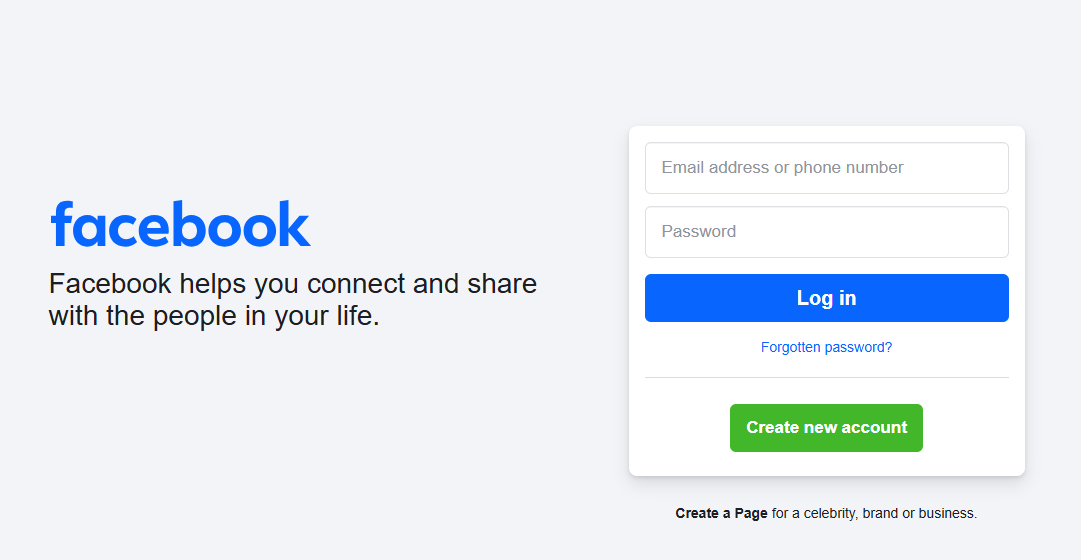
Facebook is the most widely used social media platform, with millions engaging every day. Its user-friendly interface offers seamless navigation, from checking the news feed and friend requests to messaging and managing groups or pages. Facebook has revolutionized the way people interact, whether socially or professionally.
Benefits of Social Media Websites
Social media websites aren’t merely tools for communication; they also:
- Help people stay updated on current events.
- Connect businesses with wider audiences.
- Enable real-time conversations and collaboration.
- Promote creativity through content sharing.
By understanding the structure, features, and uses of social media websites, you can effectively use these platforms to connect with others, share your ideas, and achieve your goals.
8. Business Website
A business website is essential for companies of all sizes, whether you’re running a local shop, managing a service-based brand, or operating a large corporation. These websites help businesses showcase their products, services, and values while engaging customers and building trust.
Types of Business Websites
- Small Business Websites
If you own a small business such as a local shop, café, or service-based company, a website can help you attract new customers. These platforms allow you to share information about your offerings, location, and contact details.
- Corporate Websites
Large corporations utilize websites to promote their brand, communicate with investors, and provide a detailed overview of their services. These websites showcase the mission, vision, and achievements of the business to build credibility.
- Service-Based Websites
Businesses offering services like consulting, healthcare, or legal support can create service-based websites to explain their expertise. These websites focus on how their services solve customer problems.
- Lead Generation Websites
These websites are designed to turn visitors into potential customers by collecting contact details through forms or encouraging visitors to take specific actions, such as calling or booking consultations.
Key Elements of a Business Website
- Homepage
The homepage is the first impression of your website. It highlights what your business does and directs visitors to key sections like products or services.
- About Us Page
This page shares your company’s story, values, and accomplishments. It introduces the team behind the business and helps visitors connect with your brand.
- Products and Services Page
Dedicated pages where you showcase detailed descriptions of your products or services. Including clear pricing, high-quality images, and customer benefits can improve engagement.
- Contact Page
This section makes it easy for customers to reach you. Include your business address, phone number, email, and a simple contact form for inquiries.
- Customer Testimonials/Reviews
Featuring reviews and testimonials from clients builds trust and credibility. Positive feedback showcases the value your business delivers.
Example of a Strong Business Website
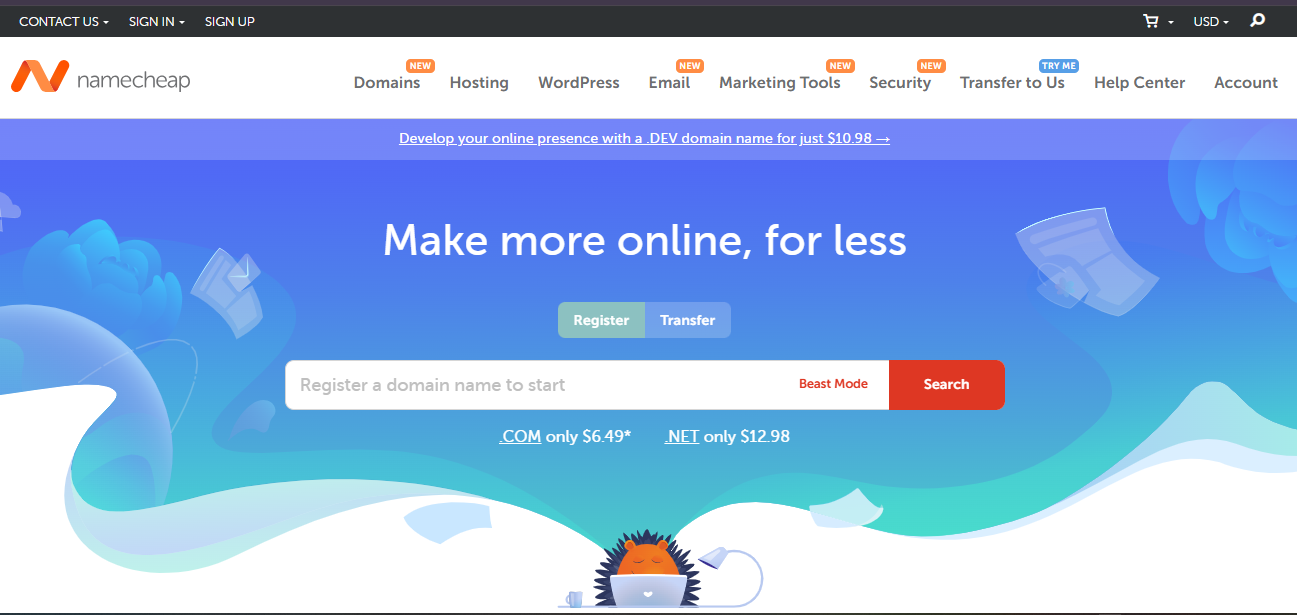
NameCheap, a domain web hosting company, is an excellent example of an effective business website. Their site is visually appealing, with smooth animations and a simple layout. The homepage clearly explains their services while promoting customer confidence using testimonials and reviews. They also utilize a strong call-to-action (CTA) with pricing information and highlight real-world success stories. These elements make their website highly user-friendly and conversion-focused.
Benefits of a Business Website
- Provides a platform to display products and services.
- Helps small businesses reach local and wider audiences.
- Builds customer trust through transparent and detailed information.
- Simplifies lead generation with easy navigation and CTAs.
- Establishes business branding across digital platforms.
By understanding the structure and purpose of business websites, companies can boost visibility, connect with their audience, and achieve long-term growth. A well-designed website is not just an online presence—it’s a core tool for building success.
9. Non-Profit Websites
Non-profit websites serve an essential role in supporting the goals and missions of various organizations. These websites help educate the public, encourage donations, and recruit volunteers to make a difference. Clear and accessible design ensures visitors can easily understand an organization’s mission and get involved.
Who Needs a Non-Profit Website?
Non-profit websites cater to different groups and purposes, including:
- Charitable Organizations: These groups focus on raising funds and building support for causes like disaster relief and community welfare (e.g., Red Cross or UNICEF).
- Advocacy Groups: They work to increase awareness and promote social or policy changes (e.g., Amnesty International).
- Foundations: Provide scholarships, grants, and support for cultural or educational projects (e.g., Bill & Melinda Gates Foundation).
- Religious Organizations: Share beliefs, ministries, and community initiatives with their members and visitors.
- Environmental Organizations: Promote awareness about critical environmental issues and seek action for protection efforts.
Core Features of a Non-Profit Website
- Mission Statement and Impact: Clearly convey your purpose and achievements. Visitors should easily find details about your goals and the positive impact of your efforts.
- Donation and Volunteer Options: Highlight donation buttons and volunteer sign-up sections to encourage contributions and engagement.
- Event Details: Announce campaigns, fundraisers, and community events to keep supporters informed.
- Updates and Blogs: Post stories, successes, and news to build transparency and foster trust.
Example of a Successful Non-Profit Website

A great example is BaitulMal. They provides life-saving, life-sustaining, and life-enriching humanitarian aid to underserved populations around the world, regardless of faith or nationality. Their donation system is straightforward, allowing supporters to contribute quickly and easily.
Why Does a Great Non-Profit Website Matter?
A well-structured non-profit website acts as the bridge between your organization and potential supporters. From sharing your mission to securing funds, it ensures you reach your goals effectively. By providing clarity, ease of use, and inspiring content, these websites encourage visitors to take action and further your cause.
10. Personal Website
A personal website is an important tool for presenting yourself online. It allows you to showcase your professional achievements, skills, and personal interests in one accessible space. Whether you’re looking to get a new job, grow your business, or share your creative projects, having a personal website can help you stand out and reach your goals.
Who Can Benefit from a Personal Website?
- Job Seekers
A personal website can act as an online resume that highlights your skills, experiences, and achievements. It’s a great way to make a lasting impression on recruiters.
- Freelancers
If you work in fields like design, writing, or photography, a personal website is a perfect platform to display your portfolio and attract potential clients.
- Entrepreneurs
Business owners can use a website to tell their story, describe their mission, and promote their services to partners, customers, or investors.
- Bloggers and Content Creators
A central space to share ideas, write about personal experiences, or recommend products can elevate your reach and audience engagement.
Types of Personal Websites
- Portfolio Websites
Showcase your work samples and projects in a visually appealing way. This type is excellent for designers, artists, or developers.
- Resume or CV Websites
A digital take on the traditional resume that can include sections like experience, skills, and contact details.
- Personal Blogs
Perfect for sharing your thoughts, hobbies, tips, or lifestyle posts with an audience.
- Creative Design Websites
Tailored for artists, designers, or photographers who want their creativity to shine.
- Entrepreneur Websites
Highlight your business goals and innovative ideas, and attract partnerships or investments.
How to Structure Your Personal Website
Creating a clean, professional, and user-friendly structure is key. Here’s what to include:
- Homepage
Your homepage should introduce who you are and what you offer in a simple, engaging way.
- About Page
Share your background, your skills, and what makes you unique.
- Portfolio Section
Feature your best work or most important achievements.
- Contact Page
Make it easy for visitors to reach out to you with a clear contact form or email address.
Examples of Excellent Personal Websites

Explore sites like Jey Austen’s personal site to see how a polished and well-organized personal website looks. These websites often combine clear layouts with professional highlights and engaging visuals.