
FlexClip Review – Free Online AI Video Editing Software
FlexClip is an online video editing software designed to make video creation easy. It provides AI tools, ready-made templates, and editing options. These help users create great videos quickly. FlexClip helps everyone from beginners to experienced editors create videos with ease. No complicated steps are required.
I spent over 30 hours testing FlexClip. I looked at its features, usability, and unique tools. In this FlexClip review, I will highlight its main features. I will also share my experience and discuss the pros and cons that you should consider.
Let’s get started!
What is FlexClip?
FlexClip is a free online video editor. You can use it to create videos for YouTube, social media, or business needs. It has many templates and editing tools. These help you easily create high-quality videos.
A notable feature of FlexClip is its AI-powered tools. These tools help users create videos quickly. They offer ready-made templates and smart editing options. This saves time compared to traditional editing software.
If you are familiar with Canva, FlexClip has a similar layout. Its simple design makes it easy to find and use the tools you need. Even beginners can start editing without any confusion.
FlexClip provides everything you need to create videos quickly. You can rely on it for fast and professional video editing. It works well for social media clips and business presentations.
Key Features of FlexClip
FlexClip is a powerful AI tool for easy and fast video editing. It offers various features that make the editing process easy for everyone. Even beginners can create professional-looking videos in minutes. I will discuss some of the top features here.
Video Editing

FlexClip has an intuitive user interface, so you can easily edit your content. It has many video editing tools like CapCut. It is a great choice for creators. With FlexClip, you can easily trim, split, and merge video clips. You can add text, music, and voiceover to parts of the video.
It also allows you to change the speed of the video, add filters, and include transitions. These features improve the quality of your content. FlexClip allows you to export edited videos in different resolutions and frame rates. This way, your videos can meet the needs of different platforms.
Templates
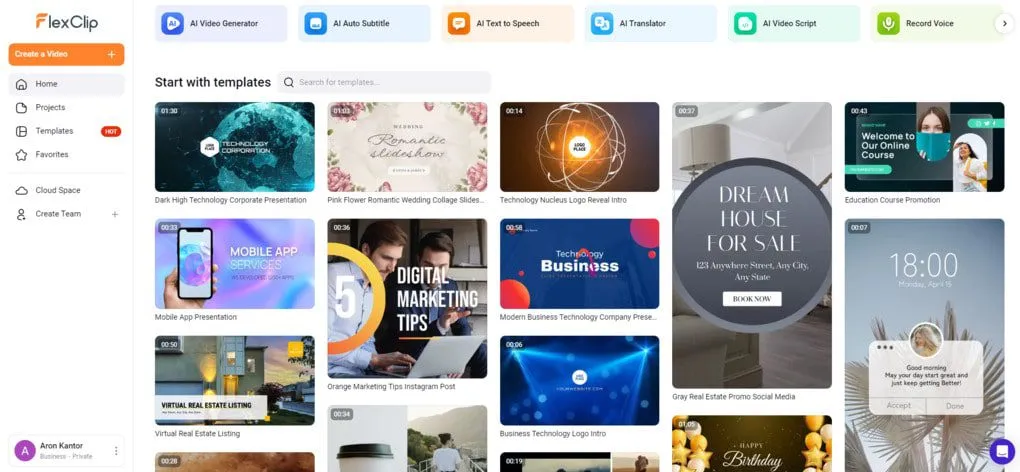
FlexClip has hundreds of templates designed to speed up video creation. These templates can be personalized with your brand, text, or images. This helps save time and effort.
You can use templates for YouTube intros, outros, social media posts, or promotional videos. Instead of starting from scratch, choose a template and adjust it to your needs.
This feature is perfect for beginners. It makes editing easier and gives you more time to focus on your ideas instead of design work.
AI Tools
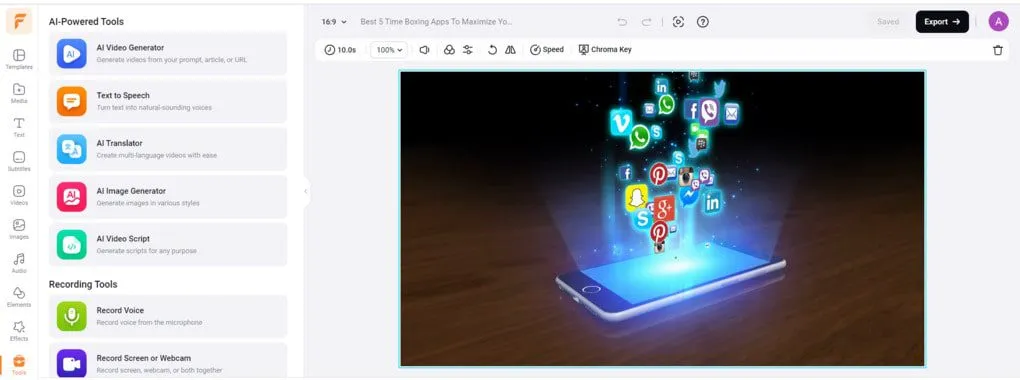
FlexClip offers smart tools that simplify video creation and save time. These features help with video scripts, visuals, and voiceovers.
- AI Video Generator: Turn prompts, articles, or links into videos.
- Text-to-Speech: Convert text into natural voiceovers.
- AI Translator: Create videos in multiple languages for global reach.
- AI Image Generator: Instantly create images from text input.
- AI Video Script: Write complete scripts based on your topic and length.
The AI Video Generator is different. It helps plan scenes, animations, and visuals, reducing editing time. These tools make it easy to create engaging content for a variety of audiences.
Audio Clips
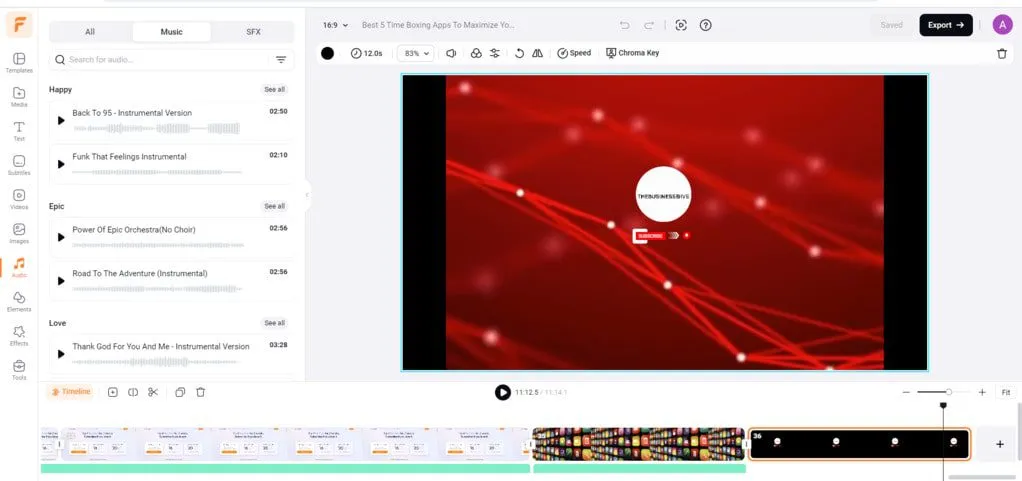
When creating videos, especially for YouTube, music and audio files can be a big problem. Using music that is not royalty-free can result in copyright strikes. This can result in serious penalties for your account.
Fortunately, FlexClip offers a wide variety of royalty-free music and sound effects for your video editing. These files are perfect for video editing and are free from copyright concerns. The platform organizes music and sound effects into clear categories.
Explore options like Happy, Epic, Love, and Inspiring. You can try Pop and many more to find the perfect match for your content.
FlexClip helps you find great audio for your videos. It ensures that your content remains copyright protected. It is a reliable choice for anyone editing videos for YouTube or other platforms.
Image Library
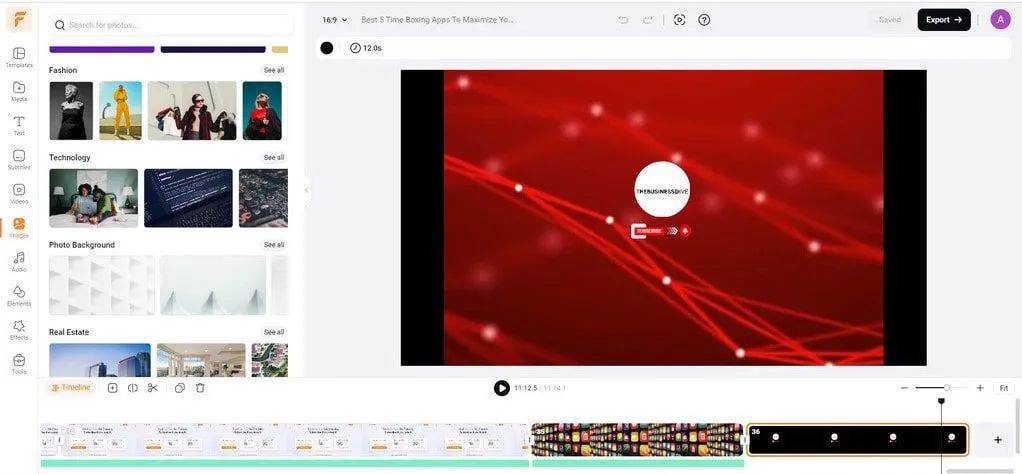
FlexClip has a huge library of images for videos. You can search by keyword or browse categories. This helps you find the right visual.
These tools make it easy to choose images that match your content. You can add text, transitions, or effects to customize the images and make your videos stand out.
This feature allows you to create professional videos. You don’t have to waste time searching for visuals outside of the editor.
Video Library
FlexClip’s video library helps you find great clips for your projects. You can easily search by keyword or browse categories to find videos that suit your needs.
All clips are royalty-free, so you don’t have to worry about copyright issues. This allows you to safely add high-quality videos to your content. There are no extra costs or worries.
FlexClip makes it easy to find the right footage. Creating a marketing video, presentation, or social media post is easy and convenient.
Cloud Storage
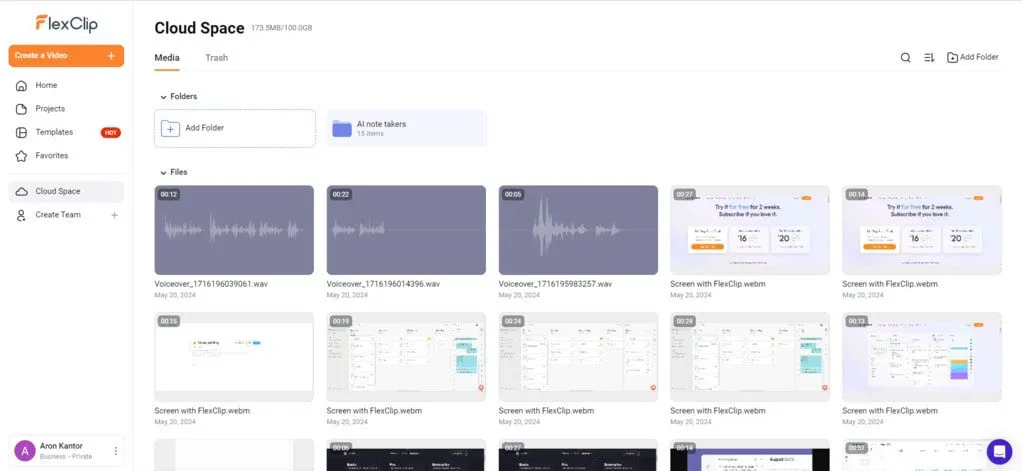
FlexClip offers cloud storage to keep your files safe and organized. Upload videos, images, and audio files directly to the cloud for easy access.
You can organize files into folders, making it easy to find what you need for any project. This feature saves time and helps you stay organized when creating new videos.
Having all your media in one place makes creating videos faster and more convenient.
FlexClip Review: My experience with FlexClip
My experience using FlexClip over the past two weeks has been amazing. I’ve worked on it for over 30 hours, and the platform has made video editing a breeze. The layout is easy to use, and I found everything I needed quickly.
One thing that stands out is the huge media library. It has a huge collection of royalty-free images, videos, and audio files. This has saved me a lot of time while editing. Instead of searching different websites for the right materials, I had everything in one place.
Having access to this library has made my work faster and more efficient. Without it, I would have spent hours searching for the perfect media. FlexClip’s features have made my editing tasks much more convenient. If you create videos, this tool can be a great asset for your projects.
FlexClip offers a variety of templates that make creative tasks easier. These templates have helped me save time on projects like intros and outros. For example, I saved over 10 hours of design work by using a pre-made outro template.
However, I ran into a small problem during one of my projects. After creating several videos, I noticed a bug in the voiceover. When the recording became longer than the video, it became too short on the timeline. To fix this, I had to manually reinsert the voiceover, which took extra time.
Besides, FlexClip’s templates are a helpful resource for anyone working on a video project.
Overall, FlexClip is a perfect tool for video creation beginners. It helps you create videos quickly with its simple design. The platform offers many templates and resources that save time. You can focus on creative ideas without worrying about technical skills.
FlexClip Review: Pricing Plans
FlexClip offers 3 simple pricing plans to meet a variety of video editing needs.
- Free Plan – Perfect for beginners or quick projects. You can use one stock video and audio per project. It allows for 12 projects with a 10-minute video limit. Videos include a FlexClip watermark. AI credits for testing are included.
- Plus Plan – Great for creators creating longer videos. You get five stock videos and audio per project. Unlimited projects allowed. While suitable for medium-sized projects, larger video needs may require more stock media.
- Business Plan – Designed for professionals and teams. Includes all features, 4K video downloads, and 100 GB of cloud storage. You can use up to five stock videos or audio files in a single project.
FlexClip offers affordable pricing that fits your project size, whether small or professional.
FlexClip Review: Pros and Cons
FlexClip is a tool that helps you create videos easily. It offers features like templates, stock media, and customization options. This platform is great for creating videos. You can use it for business, social media, or personal projects. Here is a summary of what I learned from the FlexClip review.
Pros:
- The interface is simple and easy to navigate, making it ideal for beginners.
- Use templates and tools to quickly create videos.
- Access a huge library of royalty-free images, music, and videos.
- Upload and organize your media with cloud storage for future use.
- Many features are included in the free plan, allowing you to test them before upgrading.
Cons:
- Small bugs can happen during long or detailed projects. These issues might slow progress, but they are usually easy to fix.
Overall, FlexClip is a dependable online video editor. It offers helpful tools for both beginners and experienced creators.
Looking for a FlexClip Alternative for Shorts?
If you’re looking for a tool to make short videos easy, Submagic is a great option.

Submagic is an AI video editor. It adds subtitles on the fly, saving you time. Just upload your video. Then, choose a subtitle animation and add background music. Your video will be ready for Instagram or TikTok!
This tool has been widely used for creating short-form content. Every day, more than three million businesses use it. They create engaging videos for social media. It helps you create videos that are attention-grabbing and easy to share online.
FlexClip Review: Summary
FlexClip is a powerful online video editor that makes video creation easy. If you’ve used Canva before, its interface will be easy to understand.
FlexClip is more than an editor. It helps speed up video creation and saves time. The platform is great for beginners, as its tools are simple and easy to use.
FlexClip’s AI-powered tools help improve workflow. You can create videos in a short amount of time without the usual hassle. This makes it ideal for those who want a practical and reliable editing tool.
For quick and easy content creation, FlexClip is a solid choice. It works well for both new and experienced creators.
Why You Can Trust Our Reviews
At TRT Tech, we review and test hundreds of productivity apps every year. We look at how project management tools and note-taking apps perform in real life.
We provide honest and candid reviews to help you choose the best tools for your work. Our team tests each app to see how it performs in everyday tasks.
Looking for reliable reviews of productivity apps? TRT Tech provides practical insights you can rely on. Let us help you improve your workflow with tools that deliver real results.
Have questions or suggestions? We love to hear from you. Feel free to reach out anytime at hello@trttech.ca.
Wrapping Up: FlexClip Review
FlexClip is an online video editor designed to make video creation easy and fast. It offers powerful tools and AI features. In addition, it has a huge library of royalty-free content, such as videos, images, and audio.
This platform is great for beginners as well as experienced creators. Its simple design and cloud storage help users organize their projects easily.
With FlexClip, you can create videos for YouTube, social media, and business presentations. The free plan is great for small projects. The Plus and Business plans offer advanced features for larger projects. Although there are minor flaws, they do not affect the overall performance.
FlexClip is a smart choice for anyone who wants a reliable video editor. It saves time and provides creative resources. Plus, it delivers professional-quality results for many video projects.
FAQs: FlexClip Review
Is FlexClip really free?
Yes, FlexClip has a free plan. It includes one stock video and one audio for each project. You get limited AI credits, up to twelve projects, and videos under 10 minutes long. A FlexClip watermark appears on videos. The free plan is best for experiments or small, one-time projects.
Can I use FlexClip for YouTube?
Yes, FlexClip is ideal for creating YouTube videos. Its features allow you to easily create quality content for your channel.
Is FlexClip royalty-free?
Yes, all audio, video, and image files in FlexClip are royalty-free. You can safely use them in YouTube videos or social media content.
What are the limitations of FlexClip?
- Free plan: One stock video/audio per project, limited AI credits, a maximum of 12 projects, videos under 10 minutes, FlexClip watermark, maximum 720p download.
- Plus plan: Five stock videos/audio per project, 30 GB cloud storage, no 4K downloads.
- Business plan: All features unlocked with unlimited access.
What are the alternatives to FlexClip?
Some popular alternatives include:
Can I create videos for social media platforms with FlexClip?
FlexClip makes it easy to create videos for Instagram, Facebook, TikTok, and more. Use templates, stock media, and AI tools to make engaging videos fast.