Veo 3 vs Sora: Which AI video tool should you choose in 2025?
AI video tools have made video creation faster and easier. In 2025, two popular tools stand out: Google Veo 3 and OpenAI Sora. These platforms help creators quickly create professional videos. But how do you decide which one is best for your needs?
Your choice depends on your preferences. This guide is for you if you’re running a business, growing a YouTube channel, or making marketing content. Each tool has its own unique features. Knowing about them can help you choose wisely.
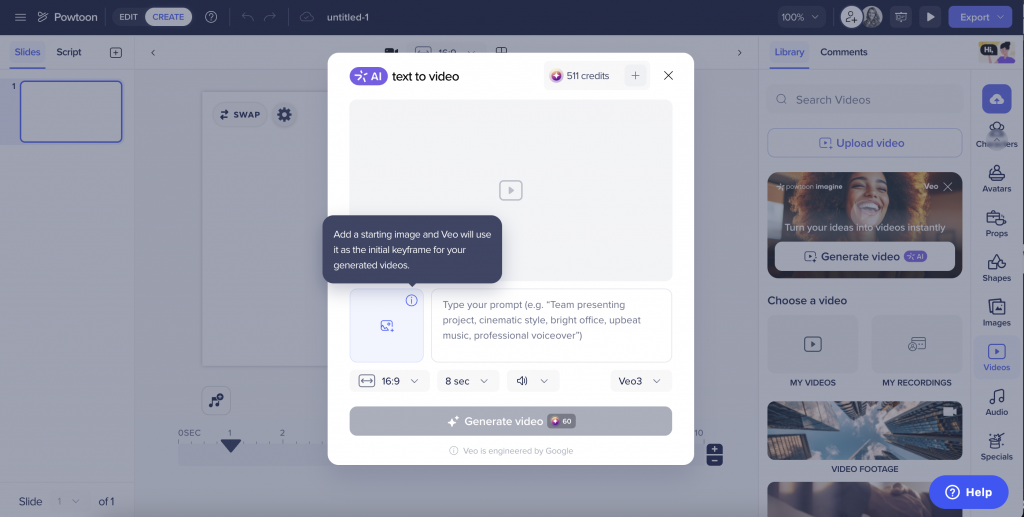
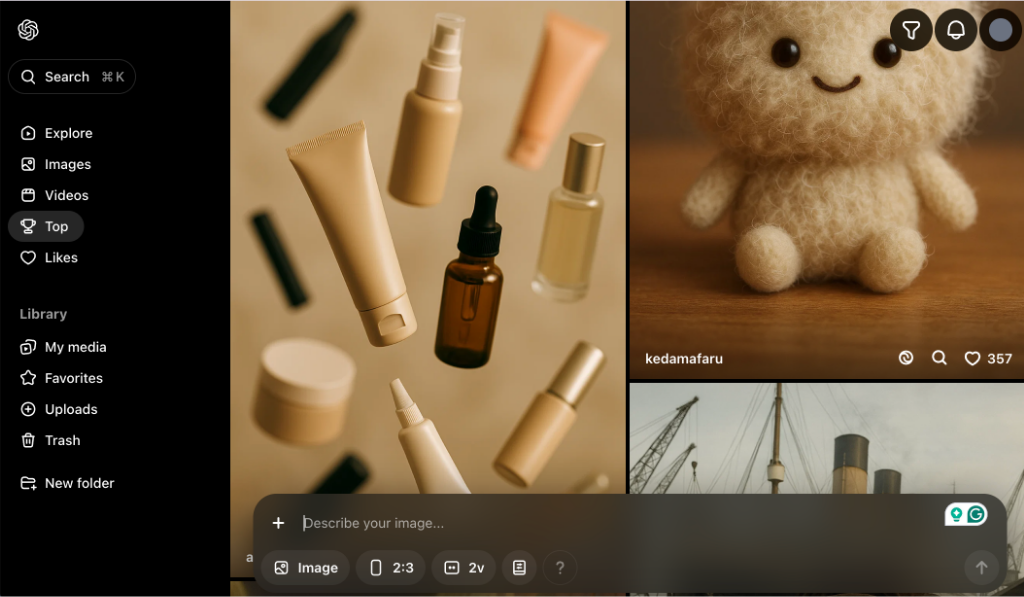
Head-to-Head Feature Comparison: Veo 3 vs Sora
Feature | Veo 3 | Sora |
Video Resolution | Up to 4K (8-second clips), 1080p (longer clips) | Up to 1080p |
Video Duration | 8 seconds (4K), up to 2+ minutes (HD) | Up to 20 seconds (can extend to 60 seconds) |
Audio Generation | Native audio with dialogue, effects, music | Silent videos only |
Input Types | Text prompts, image references, style guides | Text prompts, images, video clips |
Aspect Ratios | 16:9, 9:16 | Widescreen, vertical, square |
Lip Sync Accuracy | Excellent | Good |
Physics Simulation | Advanced | Good (some limitations) |
Character Consistency | High | High |
Editing Features | Flow integration, object manipulation | Remix, Recut, Blend, Loop, Storyboard |
Watermarking | SynthID embedded | C2PA metadata, visible watermarks |
Real-World Performance: Example Prompts in Action
To understand the difference between Veo 3 and Sora. Let’s compare how they handle the same video prompt:
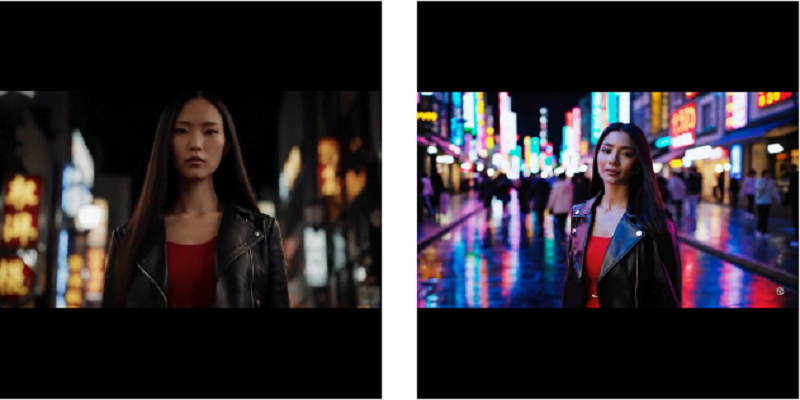
Test Prompt: “A stylish woman strolls along a Tokyo street. The area sparkles with warm neon lights and lively city signs. She wears a black leather jacket, a long red dress, and black boots.”
- Veo 3 Output: Delivers high-quality 4K video with synchronized audio. It includes detailed descriptions of street noises, footsteps, and city sounds, giving a cinematic feel.
- Sora Output: Creates 1080p visuals with consistent character design and realistic lighting. However, audio must be added separately during editing.
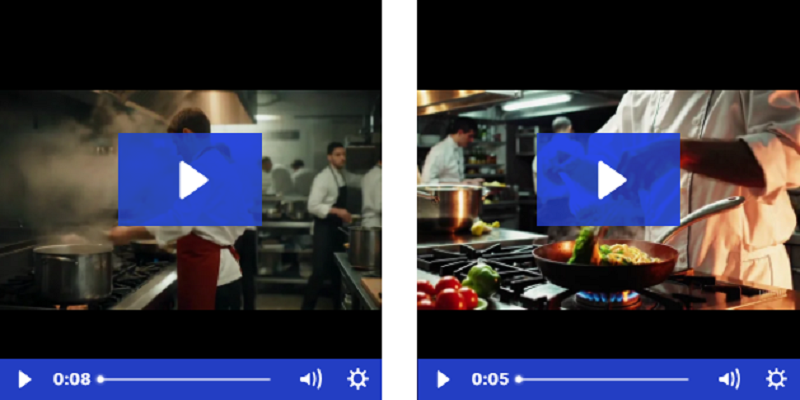
Test prompt: “A chef prepares pasta in a busy Italian kitchen with steam rising from the pot.”
- Veo 3 result: When the chef talks, it creates realistic cooking sounds. You’ll enjoy exciting effects and a lively kitchen vibe, all with perfect lip-sync.
- Sora result: Different camera angles and clear food prep make great visuals. This is ideal for editing.
Veo 3 vs Sora: Which AI Video Tool Is Right for You?
Google Veo 3 and OpenAI Sora are two popular AI tools for video creation. Both can convert text to video, but they work differently. Knowing their features will help you choose the right tool for your project.
Overview of Google Veo 3
Veo 3 is Google’s latest AI video tool, launched in 2025. It focuses on creating high-quality short videos. Its notable feature is built-in sound. It includes dialogue, music, and background noise, all from text input.
Key Features of Veo 3:
- Produces 4K video clips that are up to 8 seconds long.
- Includes dialogue, music, and ambient sounds.
- Offers professional, sharp visuals.
- Accessible via Google Flow (U.S. only).
- Ideal for short ads or professional video content.
For polished, sound-ready videos, choose Veo 3. It’s great for ads and premium content.
If you want to learn more about Google Veo 3, check out our in-depth guide: Google Veo 3 Guide: Step-by-Step Pro Tips.
Overview of OpenAI Sora
Sora by OpenAI is designed for creativity. It works seamlessly with ChatGPT Plus and Pro plans. Sora lacks sound, but it shines in making longer videos, story scenes, and concept clips.
Key Features of Sora:
- Creates 20-second clips in 1080p resolution.
- No audio support—sound must be added separately.
- Great for multi-shot stories and creative ideas.
- Fully integrated within ChatGPT—no extra tools.
- Perfect for social media, prototypes, and short films.
If you need to create new ideas or longer clips for TikTok or Instagram, Sora is a good choice.
Which AI Video Tool Should You Choose?
Choose Veo 3 for professional, high-quality videos with built-in sound. It’s best for ads or polished visuals. Go for Sora if you want more creative freedom, longer scenes, or story-based videos. Both tools offer unique strengths, so pick the one that fits your workflow and content needs.
Veo 3 vs Sora: Feature-by-Feature Comparison
Choosing between Veo 3 and Sora? Both are great AI video tools, but they serve different needs. Here’s a simple breakdown of their key features to help you decide.
Audio Capabilities: Veo 3 vs Sora
Veo 3: Offers built-in audio. It adds dialogue, background music, and sound effects directly. Perfect for videos that require sound immediately.
Sora: Doesn’t include audio. You’ll need to add music or voiceovers later using a separate video editor.
Visual Quality: Veo 3 vs Sora
Veo 3: Supports 4K resolution, producing sharp and clear visuals. Ideal for professional projects or platforms where high-quality videos matter.
Sora: Provides 1080p resolution, suitable for social media, mobile screens, and websites. It may not be the best for larger displays or professional use.
Prompt Interpretation: Veo 3 vs Sora
Veo 3: Best for creating realistic scenes. You can guide it with detailed instructions like lighting, angles, and camera motion.
Sora: Excels at making creative scenes. It’s ideal for projects with multiple characters and smooth transitions, even if visuals aren’t as lifelike.
Editing and Tools: Veo 3 vs Sora
Veo 3: Focuses on video creation but offers no built-in editing tools. You’ll need to refine the video using another editor.
Sora: Includes editing tools such as Recut, Remix, and Loop. Users can test different versions and adjust scenes before downloading.
Pricing and Accessibility: Veo 3 vs Sora
Veo 3: Available through Google Flow, but access is limited to certain regions like the U.S.
Sora: Included with ChatGPT Plus and Pro plans, making it easier to access for users already using OpenAI tools.
Both tools stand out in their own ways. If you want high-resolution videos with built-in audio, go for Veo 3. If you need creative flexibility and built-in editing, Sora might be the better choice. Choose based on your project needs and budget.
Veo 3 Pricing Plans:
| Plan | Plus | Pro (Most Popular) | Enterprise |
| Best for | Hobbyists & Beginners | Creators & Professionals | Teams & Businesses |
| Monthly Price | $37.50 | $75.00 | $150.00 |
| Annual Price | $449.90/year | $899.90/year | $1799.90/year |
| Monthly Credits | 7,500 | 18,000 | 40,000 |
| Max Video Length | 8 seconds | 8 seconds | 8 seconds |
| Video Resolution | 1080p | 1080p | 1080p |
| Audio Features | Sound effects + Lip sync | Sound effects + Lip sync | Sound effects + Lip sync |
| Processing Speed | Priority | Fastest | Fastest |
| Google Veo 3 Access | Yes | Yes | Yes |
| Commercial Rights | Yes | Yes | Yes |
| Customer Support | Basic | Priority | Priority |
Open AI Sora Pricing Plans:
| Plan | Free ($0/month) | Plus ($20/month) | Pro ($200/month) |
| Best for | Everyday users | Creators & professionals | Power users & researchers |
| Access to GPT Models | GPT-4.1 mini only | GPT-4.1, GPT-4.5 (preview), o3, o4-mini, o4-mini-high | All models, including GPT-4o and o3-pro |
| Voice Mode | Limited access | Standard + Advanced (video/screenshare included) | Advanced voice with high limits |
| Sora Video Tool | Not included | Limited access | Extended access |
| File Uploads & Data Tools | Limited access | Extended usage | Unlimited (within fair use) |
| Image Generation | Limited | Extended | Unlimited |
| Web Browsing / Real-Time Search | Yes | Yes | Yes |
| Custom GPTs | Yes | Yes | Yes |
| Projects & Tasks | No | Yes | Yes |
| ChatGPT Agent Access | No | Standard | Extended |
| Codex Agent (Preview) | No | No | Yes |
| Screensharing & Video | No | Yes | Yes |
| Billing Help & Support | Basic | Priority | Highest Priority |
Use Case Analysis: Veo 3 vs Sora
Choosing Veo 3 or Sora depends on your goals, style, and budget. Both tools are strong, but they serve different creators and projects. Here’s a clear breakdown to help you decide.
When Veo 3 Makes Sense
Veo 3 is ideal for creators who need to produce high-quality videos. It is perfect for projects where sound and visuals are important. This tool shines when you want content that looks professional and elegant. If your focus is on short-form content with cinematic results, Veo 3 is the way to go.
Veo 3 is best for:
- Professional films: 4K resolution with lifelike motion for a polished look.
- Marketing videos: Perfect for product launches, ad campaigns, and corporate projects.
- Audio-focused content: Great for music videos, narration-based clips, or dialogue scenes.
- High-budget productions: Designed for teams that work on premium projects and need consistent results.
When Sora Is a Better Fit
Sora works well for creators who like flexible and easy tools. It’s a good choice for long videos or videos without built-in audio. If you’re experimenting with new ideas or creating social media content, Sora makes it quick and easy.
Sora is best for:
- Storytelling videos: Great for creative narratives and unique sequences.
- Social media content: Ideal for platforms like TikTok and Instagram with 1080p resolution.
- Quick production: Tools like Storyboard and Recut make editing faster.
- Global access: Available in many regions, except the UK, EEA, and Switzerland.
- Affordable plans: Starts at $20/month, with options for professionals up to $200/month.
Both Veo 3 and Sora have powerful features. Your choice depends on what your content needs and how you plan to use it.
Veo 3 vs Sora: How Businesses Are Using Each Platform
Both Veo 3 and Sora are already helping businesses in a variety of ways. Veo 3 is great for high-quality, professional campaigns. Sora, on the other hand, excels in fast-paced, high-volume projects. Here’s how companies are using these tools.
Veo 3 in Action: Premium Brand Campaigns
A luxury car brand used Veo 3 to create 4K video commercials showcasing their latest model. Veo 3 created the synchronized voiceovers featured in the commercials. This removed the need for separate voice recording sessions. It also saved a lot of production time.
Results they achieved:
- Cut production time by 60%
- Delivered broadcast-ready 4K videos
- Combined audio and visual elements in one step
Veo 3 is ideal for industries that need high video quality and fast production.
Sora in Action: Social Media at Scale
A marketing agency made more than 50 Instagram reels using Sora. They did this for a fashion brand’s seasonal campaign. They used the Remix tool to create different video styles from one idea. Then, they tested each style to see which one worked best.
Results they achieved:
- Created 50+ videos in one week
- Produced multiple variations for A/B testing
- Managed the entire campaign on a $20/month plan
Sora is a great tool for brands that create a lot of content for social platforms. It’s fast, affordable, and helps marketers test and adapt quickly.
Veo 3 is perfect for premium campaigns. Sora helps brands meet high-volume social media needs.
Veo 3 vs Sora: Technical Performance and Limitations
No AI video generator is without limitations. Veo 3 and Sora are popular platforms. They help users create videos quickly and easily. But, there are some downsides users should think about before picking the best option.
Veo 3 limitations
Veo 3 is known for high-quality output, but it has some issues that could impact your workflow:
- Generating 4K videos requires more processing power, which could slow down performance.
- Currently, it only supports two aspect ratios: 16:9 and 9:16.
- Video clip imports are not supported, unlike Sora.
Sora limitations
Sora offers creative flexibility, but it struggles with technical challenges:
- It doesn’t support audio generation, so you’ll need external tools for sound.
- The resolution is capped at 1080p, which may not suit all needs.
- Its availability is limited in the EU and UK.
- Users have reported issues with physics accuracy in complex scenes.
- High demand can lead to delays and limited access during peak hours.
Looking Ahead: The Future of AI Video (2025 and 2026)
Both platforms are working on significant updates to address their current issues.
Veo 3 development timeline:
- By Q3 2025, it will expand availability outside the U.S.
- Deeper integration with Google Workspace tools is expected by late 2025.
- By 2026, it aims to support 8K resolution and longer video durations.
Sora development timeline:
- Sora is set to launch in the EU and UK by mid-2025.
- Audio generation is in development, with a release expected in Q3 2025.
- By 2026, it may introduce 4K resolution and enterprise-focused features.
What to Expect from AI Video Tools: Veo 3 vs Sora
In the coming years, these tools are expected to reduce video production costs by 40-60%. They can reduce production time from weeks to just a few hours. AI will generate the content. Meanwhile, human creators will refine it.
Choose between Veo 3’s top quality and Sora’s creative tools based on your needs. Review their features and limitations. This will help you find the one that fits your workflow and production needs.
Veo 3 vs Sora: Making Your Choice
Sora is perfect for creators who need quick and easy editing. It’s a budget-friendly option for small projects. You can use it for social media, teaching, or creative experiments. Built-in tools help individuals and small teams work quickly and stay organized.
Veo 3 is designed for projects that require professional visuals and clear audio. It’s great for brand campaigns, video productions, or any content that needs a cinematic touch. If visuals and sound are your priority and you have the budget, Veo 3 is a good option.
FAQs: Veo 3 vs Sora
What is Sora used for?
Sora is perfect for simple edits and small projects. It’s great for making content such as social media posts, teaching materials, or quick creative tasks.
Can Sora handle high-end projects?
Sora has many features, but it is more suitable for smaller tasks that are budget-friendly. It is not designed for big, professional-level work.
Who should use Veo 3?
Pros in brand campaigns and video production designed Veo 3. It delivers high-quality visuals and audio for any project.
Does Veo 3 support cinematic visuals?
Yes, Veo 3 offers polished visuals and professional audio. This makes it perfect for cinematic projects.
Which is more affordable, Sora or Veo 3?
Sora is the cheaper option, ideal for individuals or small teams with tight budgets.